WhatsApp Support : 0331 3315100

Experience Wild Tokyo Casino App Everywhere At Any Time

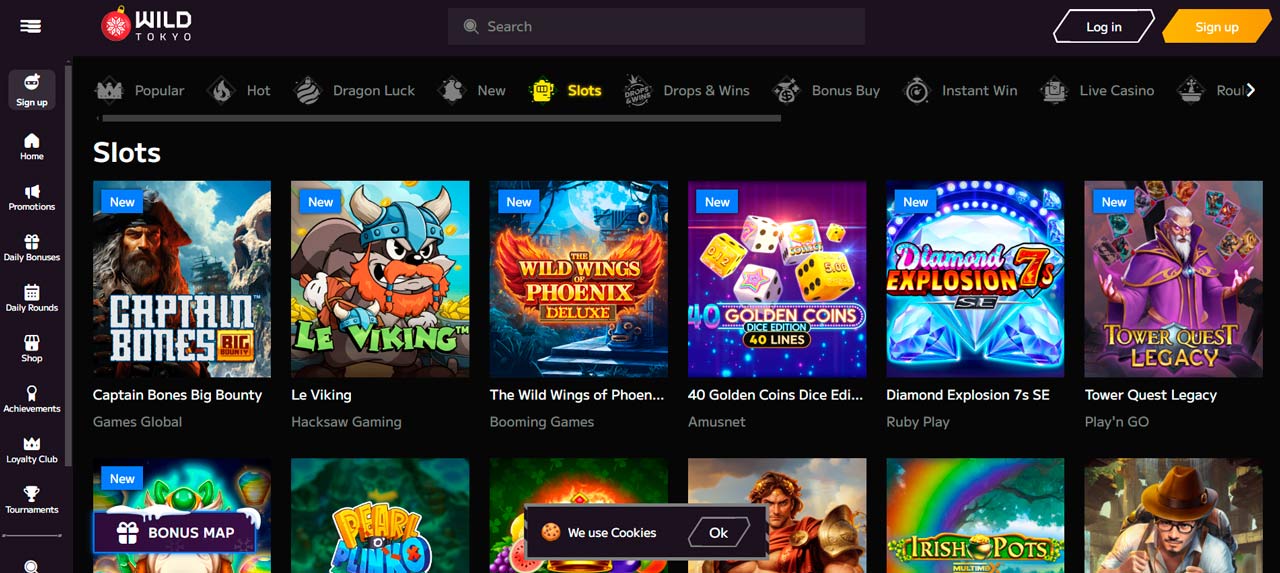
We developed the Wild Tokyo Casino mobile app to provide you the same complete gaming floor you experience on a desktop, packed into a touch-optimised interface that goes with you. While you wait for a train, lounging on a couch, or simply like the directness of a smartphone, the app brings thousands of slots, live dealer tables, and classic table games directly in your hand. The experience is not a stripped-down mobile site with restricted titles. It is a comprehensive application where you can fund, collect bonuses, turn reels, talk with live croupiers, and ask for withdrawals using the same account credentials you already rely on. We designed the navigation around thumb-friendly zones, fast loading, and minimal data overhead so that a few spare minutes transform into a real session. In the sections that follow we describe exactly which devices are compatible, how to install the app on Android and iOS, what to expect from the cashier, and how the app handles performance and security. Every detail we outline here corresponds to the current release accessible through our official channels, and we update the app regularly to keep pace with new operating system versions and device capabilities.
How to Install the App on Apple Devices
For iOS users, the most straightforward route is to install the Wild Tokyo Casino app straight from the Apple App Store. We have an active listing that meets Apple’s guidelines for real-money gaming applications in permitted jurisdictions. You can find the app by looking “Wild Tokyo Casino” in the App Store, or by clicking the link we give on our mobile page. The installation process is like any other iOS app: tap “Get,” verify with Face ID, Touch ID, or your Apple ID password, and the app will load and install automatically. Once the icon shows up on your home screen, you are set to log in. We advise enabling automatic updates in your device settings so you always have the latest version with the newest games and security patches.
In regions where the native iOS app is not listed, or if you prefer a lighter alternative, we have a Progressive Web App experience that can be added to your home screen. To do this, open Safari and go to our mobile site. Tap the Share icon at the bottom of the screen, then scroll down and select “Add to Home Screen.” You can change the shortcut if you like, then tap “Add.” This makes an icon that behaves like a standalone app: it opens in its own window without browser controls, enables full-screen gaming, and keeps you logged in. While the PWA does not offer push notifications on iOS, it nevertheless provides the same game library and cashier functionality. We ensure the web app optimised so that load times and touch responsiveness are almost indistinguishable from the native version for many players.
Steps to Download the Wild Tokyo Casino App on Android
Since Google Play restricts real-money gambling applications in many regions, we offer the Android app directly from our website as an APK file. This is a common practice within licensed online casinos, and we take several precautions to ensure the file you download is authentic and unaltered. The process commences by visiting our official mobile page on your Android device. Locate the clearly marked download button, which will begin fetching the latest APK version. Your browser may show a warning about downloading files from unknown sources; this is expected and simply shows that the file does not originate from the Play Store. We cryptographically sign every build, and you can check the integrity of the download by reviewing its digital signature if you have the technical tools, though most players will not have to do this.
Before you can deploy the file, you must enable your device to receive applications from the browser or file manager you used. On modern Android versions, this permission is assigned per app rather than as a system-wide setting. When you select the downloaded APK, Android will request you to enable installations from that specific source. Switch the permission on, then move forward. The installer will show the app’s requested permissions, which usually include internet access, storage access for caching game assets, and optionally notification access. We do not seek access to your contacts, call logs, or other unrelated data. Once you confirm, the installation ends in a few seconds. After that, you can locate the Wild Tokyo Casino icon in your app drawer. We recommend deleting the APK file afterwards to free up space.
Detailed Installation Guide
- Launch your mobile browser and go to the official Wild Tokyo Casino website.
- Press the “Mobile App” or “Download for Android” button prominently displayed on the page.
- Allow for the APK file to download completely. You can monitor progress in your notification bar.
- Click the downloaded file. If a security prompt appears, pick “Settings” and enable “Allow from this source.”
- Hit “Install” and pause a few seconds for the process to finish.
- Tap “Open” to launch the app, or locate the Wild Tokyo icon on your home screen.
- Log in with your existing credentials or create a new account directly inside the app.
Fast Account Setup and Login via the App
If you already hold an account with Wild Tokyo Casino, logging into the app needs only a few seconds. Enter the email address and password you registered with, and the app will synchronize your balance, bonus status, and game history instantly. We support biometric authentication on both platforms, so after your first login you can turn on fingerprint or face recognition to avoid typing credentials each time. This feature is not mandatory and can be switched in the app’s security settings. Your biometric data never exits your device; the app simply obtains a confirmation from the operating system that authentication passed. For players who use two-factor authentication, the app connects with authenticator apps and SMS codes exactly as the desktop site does, adding an extra layer of protection without complicating the login flow.
New players can set up an account entirely within the app. The registration form gathers the same information we need on desktop: full name, date of birth, email address, phone number, residential address, and preferred currency. We ask for these details to meet licensing requirements and to authenticate your identity before your first withdrawal. The app employs your device’s camera to record identity documents during the Know Your Customer process, and the upload is secured end-to-end. Once you submit the form, our system runs automatic checks and typically activates your account within minutes. You can fund and play straight away, though document verification may be necessary before a payout is processed. The app will notify you if any additional steps are required, and you can monitor your verification status from the account menu at any time.
Mobile Gaming Experience: Slot Machines, Live Dealer Casino, and Table Casino Games
The app provides the same game engine that powers our desktop site, so slots start with crisp graphics and smooth reel spins at 60 frames per second on capable hardware. We partner with providers such as Pragmatic Play, Evolution, Play’n GO, and NetEnt, all of whom develop their games in HTML5 with mobile-first design. That ensures button placements, bet selectors, and autoplay controls are scaled for fingers, not mouse cursors. When you click the spin button, the response is immediate, and the app uses hardware acceleration to render particle effects and bonus animations without stuttering. You can toggle between real-money mode and demo mode on most slots, which is beneficial for testing a game’s mechanics before committing funds. The demo mode requires no deposit and is available even when you are logged out.
Live casino games stream from professional studios in HD quality, and the app automatically picks the appropriate bitrate based on your connection speed. On a stable 4G or Wi-Fi network, you can anticipate crisp video with synchronised audio and a chat panel that lets you engage with the dealer and other players. The betting interface overlays the stream without obscuring the table, and you can make bets with a single tap on the chip values and betting areas. For games like Live Blackjack and Live Baccarat, the app offers a choice of camera angles where available. Table games such as European Roulette and Multihand Blackjack use a virtual felt layout that reacts to touch gestures for chip placement and bet clearing. The random number generator outcomes are verified by independent testing labs, and the app presents the same return-to-player information you would locate on the desktop version, ensuring full transparency.
App Navigation and UI Walkthrough
Upon opening the Wild Tokyo Casino app, the opening screen shows is the game lobby, organised into clear categories such as Slots, Live Casino, Table Games, and New Releases. A fixed bottom navigation bar gives you one-tap access to the lobby, your account, the cashier, and the promotions page. We purposely kept the interface uncluttered to ensure game thumbnails remain large enough to tap precisely, even on smaller screens. A search icon at the top allows you to find a certain title by name or provider, and filter chips below the search bar enable you to narrow the list by features like “Megaways,” “Bonus Buy,” or “Jackpots.” The app remembers your filter choices during a session, allowing you to browse multiple categories without resetting your preferences every time.
Inside any game, the interface adjusts to portrait or landscape orientation by default. Slot games are set to landscape mode for the best view of the reels, while table games and live dealer streams usually function well in portrait mode, with betting controls positioned at the bottom of the screen. Swiping left or right on the game screen enables you to move between titles without returning to the lobby, a feature we incorporated based on player feedback. The account menu contains your balance, transaction history, bonus details, and responsible gaming tools. We also included a quick-access button https://www.bbc.co.uk/programmes/p01029mq that floats on the lobby screen, allowing you to jump straight into your most recently played game. Every element is built to minimise the number of taps between launching the app and placing a bet, because we know that convenience is the main reason you installed the app in the first place.
Supported Devices and OS Requirements
We build the Wild Tokyo Casino app to operate on a vast range of smartphones and tablets, but we concentrate our testing on devices that make up the majority of our player base https://wildtokyo.app/app/. For Android, the app demands a device running Android 8.0 (Oreo) or later. In practice, that includes almost any phone launched from 2017 onward, including popular lines such as Samsung Galaxy S8 and newer, Google Pixel 2 and newer, OnePlus 5 and newer, and Xiaomi models with MIUI based on Android 8+. Tablets like the Samsung Galaxy Tab S4 and later are also entirely supported. The app works best with at least 3 GB of RAM and a screen resolution of 720p or higher. Lower-end devices may still open the app, but live dealer streams and graphic-intensive slots could show slower frame rates. We very recommend ensuring your device’s operating system updated to the latest available version to gain from security patches and performance improvements.
On the Apple side, the app supports iPhones and iPads running iOS 13.0 or later. This includes iPhone 6s, iPhone SE (1st generation), and all later models. For iPads, the app is usable with iPad Air 2, iPad mini 4, and any later tablet. We take advantage of Apple’s Metal graphics framework to display slot animations fluidly, so older devices that cannot run iOS 13 are left out to keep a quality baseline. The app tailors its interface to different screen sizes on its own, and on iPads you can utilize Split View and Slide Over multitasking features if you want to keep the casino open alongside another application. We do not right now offer a specific app for Windows phones or BlackBerry devices, but the mobile web version of Wild Tokyo Casino continues to be available for any device with a modern browser, and it provides a equivalent experience when a native app is not an option.
Lowest and Suggested Specifications
Android
- Minimum OS: Android 8.0 (API level 26)
- Suggested OS: Android 12 or later
- RAM: 3 GB minimum, 4 GB or more recommended for live casino
- Screen: 720 x 1280 pixels minimum
- Storage: approximately 150 MB free space for the app, plus saved game assets
iOS
- Minimum OS: iOS 13.0
- Suggested OS: iOS 16 or later
- Devices: iPhone 6s / iPad Air 2 or newer
- Storage: around 180 MB starting installation
Why Pick the Wild Tokyo Casino Mobile App?
Setting up the exclusive app alters how you engage with our platform. Rather than inputting a URL into a browser and waiting for pages to reload, you get a native container that recalls your preferences, holds you logged in securely, and starts in under a second. The app also enables push notifications, which we use sparingly to notify you about time-sensitive promotions, tournament start times, or a pending withdrawal update. Because the software runs directly on your device, touch gestures feel more responsive than they do inside a mobile browser. Sliding through game thumbnails, tapping to spin, and zooming to zoom on a live roulette table all respond with the kind of immediacy you expect from a modern app. We have also optimized the layout so that the most-used controls — deposit button, game lobby, and account menu — sit within easy reach of your thumb, reducing strain during longer sessions.
Another reason to pick the app is consistency. The game library is equivalent to what you see on desktop. Every slot provider we partner with offers its titles in HTML5, so the same mathematics, return-to-player percentages, and bonus features run unchanged on your phone. Live casino streams conform to your connection speed and screen orientation automatically. If you change from a Samsung Galaxy to an iPad, your balance, bonus wagering progress, and transaction history follow you because they are connected to your account, not to a device. The app also renders it simpler to handle responsible gaming tools. Deposit limits, session reminders, and self-exclusion options are accessible from a dedicated menu that does not require navigating through multiple browser tabs. For anyone who plays regularly, the time saved by tapping an icon instead of opening a browser and logging in each time mounts quickly, and the overall feel is closer to a premium entertainment product than a web page.
Depositing and Payouts & Banking Management on Mobile
We integrated the cashier straight into the app so that you can top up your account or submit a payout without moving to a browser. The deposit screen presents all offered payment methods for your region, which usually include Visa and Mastercard debit and credit cards, e-wallets including Skrill and Neteller, prepaid vouchers including Paysafecard, and cryptocurrencies where supported. Tapping a method opens a secure form that uses tokenisation to protect your card details. The app can remember your preferred payment method for speedier repeat deposits, and you can store multiple methods and toggle between them. Minimum and maximum deposit limits are shown clearly before you confirm a transaction, and the app indicates any fees that may apply, although we do not apply deposit fees at all.
Withdrawals follow the same path. You select the withdrawal method, type the amount, and submit the request. The app indicates the estimated processing time, which changes by method: e-wallet withdrawals are frequently processed within a few hours, while card withdrawals and bank transfers can take between one and five business days. You can submit verification documents using the app’s document centre, and our compliance team reviews them promptly to avoid delays. We use the same SSL/TLS encryption for all financial transactions like on on desktop, and biometric authentication can be enabled as an extra confirmation step before any withdrawal is sent. The transaction history tab offers a real-time log of every deposit, withdrawal, and bonus credit, with status indicators so you can always see where your funds stand.
Common Payment Methods Accessible in the App
- Visa and Mastercard debit/credit cards
- Skrill and Neteller e-wallets
- Paysafecard prepaid vouchers
- Wire transfer (processing times differ by country)
- Cryptocurrencies (Bitcoin, Ethereum, Litecoin, and other coins where permitted)
Operational Speed, Data Consumption, and Offline Aspects
The Wild Tokyo Casino app is engineered to be resource-efficient while delivering high-quality visuals. The initial installation package is compact, but the app fetches additional game assets on demand when you start a title for the first time. This maintains the base footprint small and stops your device storage from filling up with files for games you never play. Once a game is stored, subsequent launches are nearly instantaneous. We recommend connecting to Wi-Fi when you expect to explore many new games in one session, as fetching high-resolution assets over mobile data can use up several hundred megabytes. During regular play, data usage is similar to streaming music: a typical slot session uses around 5–15 MB per hour, while live casino streams can use 200–400 MB per hour at the highest quality setting. You can reduce live streaming data consumption by choosing a lower video quality in the in-game settings menu.
The app needs a continuous internet connection because all game outcomes are decided server-side and financial transactions must be verified in real time. There is no offline mode for real-money play, and we do not store sensitive account data locally in a way that would enable offline access. That said, the app saves your lobby layout and recently played game list so that navigation appears snappy even on slower connections. Push notifications are another performance consideration. We use them to inform you about new game releases, bonus offers, and account updates, but you can customise which categories you receive in the app’s notification settings. We also respect battery life by restricting background activity when the app is not in focus, and we suggest closing the app fully when you are not playing to prevent unnecessary data usage. Regular updates released through the App Store or our APK distribution channel include performance improvements and compatibility fixes, and we recommend you to install them promptly to preserve the best possible experience.